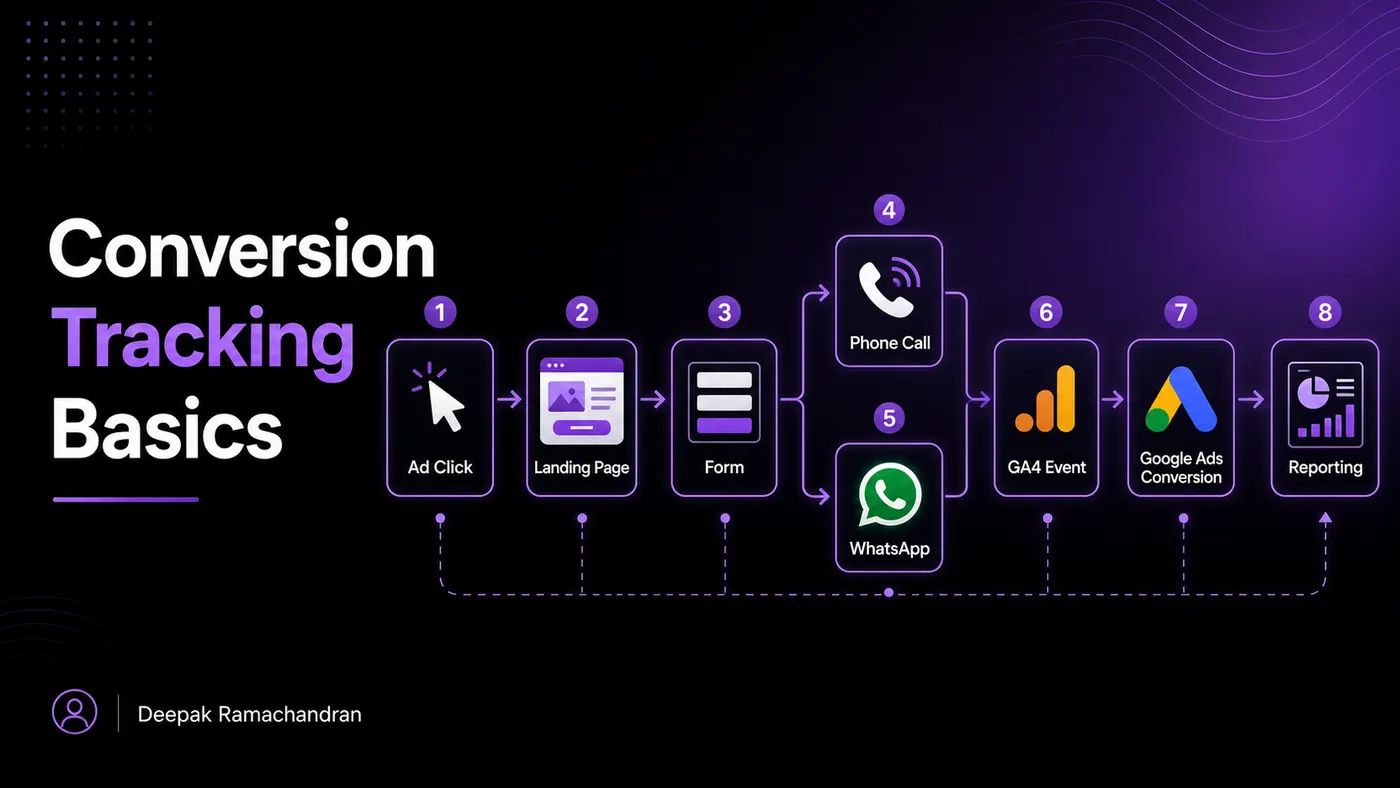
Conversion Tracking Basics are essential for understanding what happens after someone clicks an ad, visits a landing page, fills out a form, calls a business, sends a WhatsApp message, or completes any valuable action.
In performance marketing, clicks alone are not enough.
A campaign may generate traffic, but traffic does not automatically mean business growth. The real question is:
Did the user take the action that matters?
That action could be a lead form submission, purchase, phone call, WhatsApp click, appointment booking, brochure download, sign-up, or demo request.
Conversion tracking connects marketing activity with measurable outcomes. After tracking is configured, a GA4 reporting workflow helps analyze events, key events, landing pages and campaign sources. Without it, campaign optimization becomes guesswork.
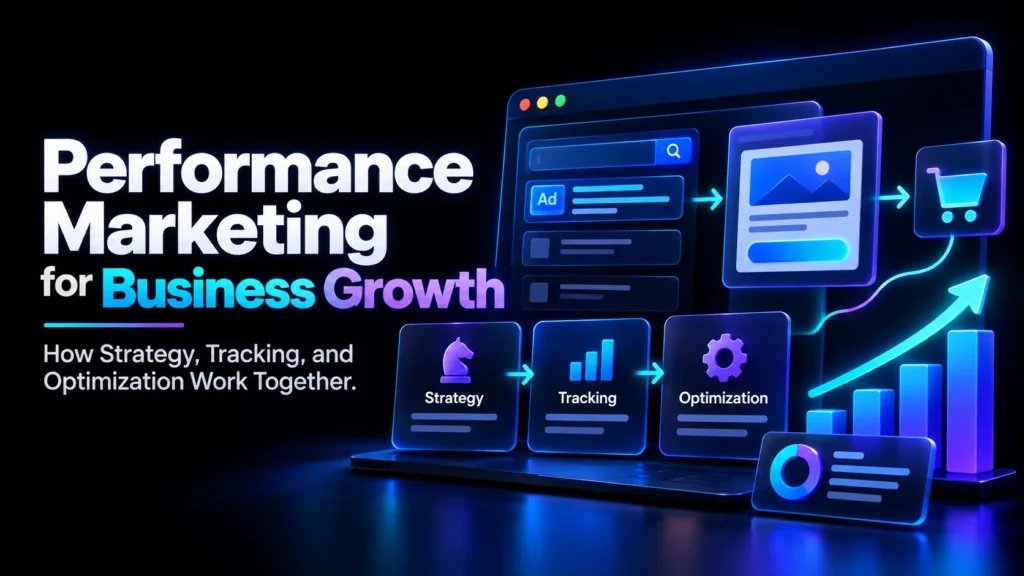
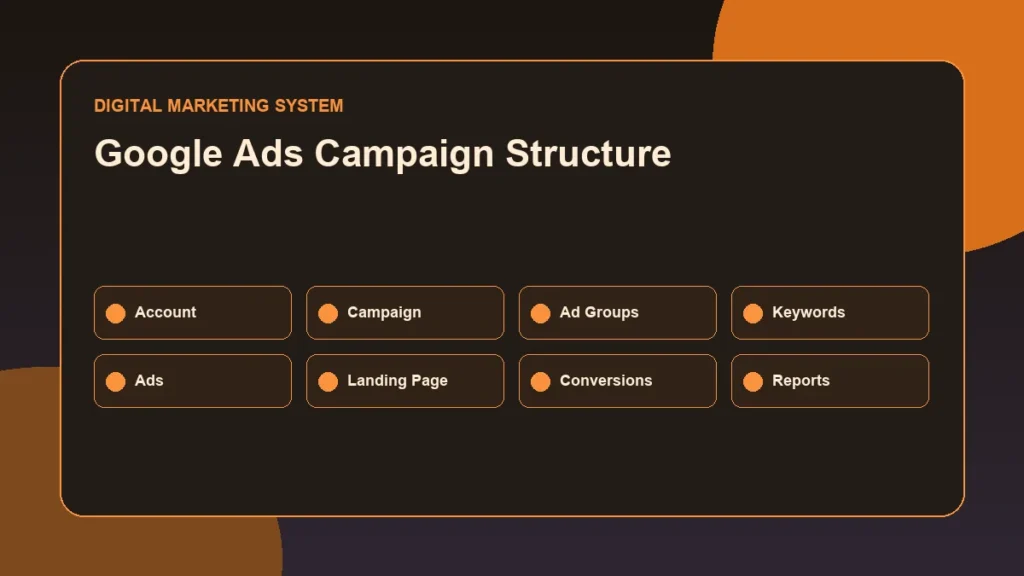
On my website, the Performance Marketing Resource Hub is structured to connect Google Ads, Meta Ads, landing pages, conversion tracking, GA4 reporting, CRO, and campaign planning into one practical performance marketing system.
What is conversion tracking in performance marketing? Conversion tracking in performance marketing is the process of measuring valuable user actions such as form submissions, calls, WhatsApp clicks, purchases or bookings after a visit. It connects traffic sources, website events, GA4 key events, advertising-platform conversions and business outcomes so campaign decisions are based on tracked actions instead of clicks alone.
Which conversions should a service business track?
A service business should track actions that show real intent, such as enquiry forms, phone clicks, WhatsApp clicks, appointment requests and qualified lead submissions. Soft actions can be tracked too, but they should not be confused with business outcomes.
How does conversion data move into GA4 or an advertising platform?
Conversion data usually starts as a website event captured by a tag, pixel, thank-you page or button-click trigger. Important events can become GA4 key events, and selected actions can be imported or sent to advertising platforms as conversions.
How can conversion tracking be tested?
Conversion tracking can be tested by completing a controlled form submission or click action, checking tag firing, reviewing GA4 debug data and confirming the ad platform received the event. Testing should happen before campaign decisions rely on the data.
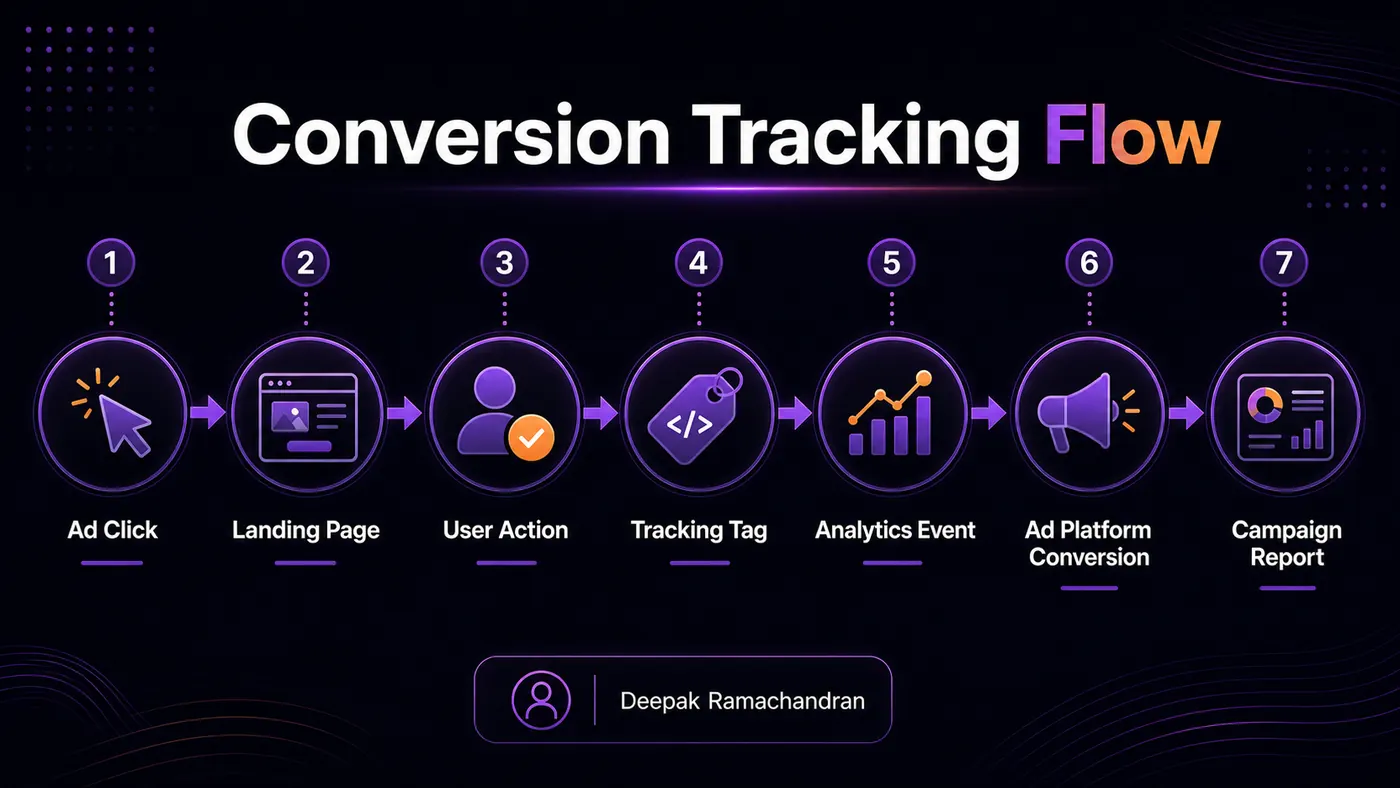
- Ad or Organic Visit
- Landing Page
- Form/Call/WhatsApp Action
- Tag/Event
- GA4
- Advertising Platform
- Report
This original visual is provided as readable HTML so users and search systems can understand the full process without relying only on an image.
Tracking terms to distinguish
- Event: a measured interaction such as click, form_submit or phone_click.
- Key event/conversion: an important website action marked for reporting.
- Advertising-platform conversion: an action used by Google Ads, Meta Ads or another ad platform for reporting or optimization.
- Business outcome: the real commercial result, such as a qualified enquiry or sale, which should not be invented from tracking data alone.
Related reading and topical path
This article connects to its hub, guide and related supporting articles.
- /performance-marketing-resource-hub/
- /performance-marketing-guide/
- /google-ads-campaign-structure/
- /landing-page-optimization-for-paid-ads/
Written by Deepak Ramachandran
Reviewed/updated: June 16, 2026
Table of Contents
- What Is Conversion Tracking?
- Why Conversion Tracking Matters in Performance Marketing
- How Conversion Tracking Works in Practice
- Conversion Tracking Basics Step by Step
- Common Conversion Tracking Mistakes
- Practical Example: Conversion Tracking Plan for a Lead Generation Campaign
- Final Conversion Tracking Checklist
- Conclusion
- FAQ Section
What Is Conversion Tracking?
Conversion tracking is the process of measuring important user actions on a website, landing page, app, or ad campaign.
A conversion is not just any action. It is an action that has value for the business.
Examples of conversions include:
Form submission
Phone call click
WhatsApp click
Purchase
Newsletter sign-up
Appointment booking
Quote request
Demo request
Lead magnet download
Payment completion
Account registration
Contact button click
For performance marketing, conversion tracking helps answer:
Which campaign generated leads?
Which ad brought enquiries?
Which keyword converted?
Which landing page worked better?
Which audience produced valuable actions?
What was the cost per lead?
Which channel deserves more budget?
Which traffic is not converting?
The Google Ads website conversion measurement guide explains that website conversion measurement tracks specific actions users take after interacting with Google Ads, helping advertisers understand behavior and campaign performance.
A simple way to understand conversion tracking is:
Ads bring users.
Landing pages guide users.
Conversion tracking measures user action.
All three need to work together.
Why Conversion Tracking Matters in Performance Marketing
Performance marketing is built on measurement.
If a campaign is spending money, the marketer needs to know what that money is producing.
Without conversion tracking, a campaign may only show surface-level metrics like:
Impressions
Clicks
CTR
CPC
Reach
Landing page views
Engagement
These metrics are useful, but they do not fully show business impact.
For example, two campaigns may look like this:
- Campaign A
Clicks: 1,000
Cost: ₹5,000
Leads: 10
Cost per lead: ₹500 - Campaign B
Clicks: 600
Cost: ₹5,000
Leads: 25
Cost per lead: ₹200
If only clicks are reviewed, Campaign A may look stronger. But when conversions are tracked, Campaign B is clearly more efficient.
That is why conversion tracking matters.
It helps measure:
Cost per lead
Conversion rate
Lead quality
Campaign efficiency
Ad performance
Keyword performance
Landing page performance
Budget waste
Funnel drop-off
Optimization direction
From a performance marketing perspective, tracking is not an optional technical setup. It is the base system that makes campaign decisions possible.
This connects directly with the Performance Marketing Guide, where strategy, tracking, landing pages, and optimization need to work together.
How Conversion Tracking Works in Practice
Conversion tracking usually works through events, tags, pixels, thank-you pages, and ad platform conversion actions.
The setup depends on the platform and business goal.
Conversion actions
A conversion action is the specific action you want to measure.
Examples:
Submit lead form
Click call button
Click WhatsApp button
Complete purchase
Book appointment
Download brochure
Visit thank-you page
Sign up for webinar
In Google Ads, conversion actions help advertisers track the valuable outcomes generated after users interact with ads. Google Ads supports different conversion measurement types, including website actions, phone calls, app actions, and offline conversions.
For a lead generation website, the most important conversion action is usually a qualified enquiry.
For an e-commerce website, the most important conversion action is usually purchase.
For a service business, conversion actions may include form submissions, calls, WhatsApp clicks, and appointment bookings.
Events and key events
In GA4, user interactions are measured as events.
Examples of events:
page_view
click
form_submit
generate_lead
purchase
scroll
file_download
phone_click
whatsapp_click
Important events in Google Analytics are called key events. Google Analytics defines a key event as an event that measures an action important to the success of a business.
This is important because GA4 reporting and Google Ads conversion reporting are connected but not always identical.
In simple terms:
GA4 measures website and app events.
GA4 key events mark important business actions.
Google Ads conversions measure actions used for ad reporting and optimization.
Google also explains that the name change to “key events” in Analytics helps create clearer separation between Google Ads conversions and Google Analytics reporting.
For practical performance marketing, this means tracking setup should be planned carefully before campaign scaling.
Tags and pixels
Tags and pixels are small tracking codes used to collect user action data.
Common tracking tools include:
Google tag
Google Tag Manager
GA4 tag
Google Ads conversion tag
Meta Pixel
LinkedIn Insight Tag
Microsoft Ads UET tag
Google Tag Manager is often used because it helps deploy and manage tracking tags without editing the website code every time. Google’s own Google Ads documentation mentions GTM as an option for deploying and updating conversion tracking tags.
For a WordPress website, GTM can be added through a plugin or manually through the theme/header setup. After that, tags, triggers, and variables can be configured inside GTM.
Thank-you pages and button clicks
Two common tracking methods are:
Thank-you page tracking
Button click tracking
Thank-you page tracking works like this:
User fills form
User is redirected to thank-you page
Thank-you page visit is counted as conversion
Button click tracking works like this:
User clicks a button
Click event is captured
The action is counted as conversion or event
Examples:
Click-to-call
WhatsApp click
Download button
Book appointment button
Submit button
Thank-you page tracking is usually cleaner for form submissions, but only if the thank-you page is shown after successful submission.
Button click tracking is useful for calls, WhatsApp, downloads, and important CTA clicks.
Conversion Tracking Basics Step by Step
Use this process before launching or scaling paid ad campaigns.
1. Define the business goal
Before setting up tracking, define the business goal.
Common goals include:
Lead generation
Sales
Bookings
Calls
WhatsApp enquiries
Demo requests
Quote requests
Newsletter sign-ups
Downloads
Store visits
App installs
A campaign without a clear goal cannot have strong tracking.
Ask:
What action matters most?
What does the business want from the campaign?
Which action shows real interest?
Which action should be counted as a conversion?
Which action is only a supporting signal?
For example, a service business may care more about enquiry forms and phone calls than page views.
An e-commerce store may care more about purchases and add-to-cart events.
A course business may care about demo bookings, brochure downloads, or sign-ups.
2. Choose the main conversion actions
After defining the goal, choose the main conversion actions.
For lead generation campaigns, main actions may include:
Form submission
Phone call click
WhatsApp click
Appointment booking
Quote request
For e-commerce campaigns, main actions may include:
Purchase
Add to cart
Begin checkout
Payment success
Product enquiry
For a local service business, main actions may include:
Call button click
Directions click
WhatsApp click
Contact form submission
Booking request
Do not track every small click as a main conversion.
The goal is to identify actions that indicate business value.
3. Separate primary and secondary conversions
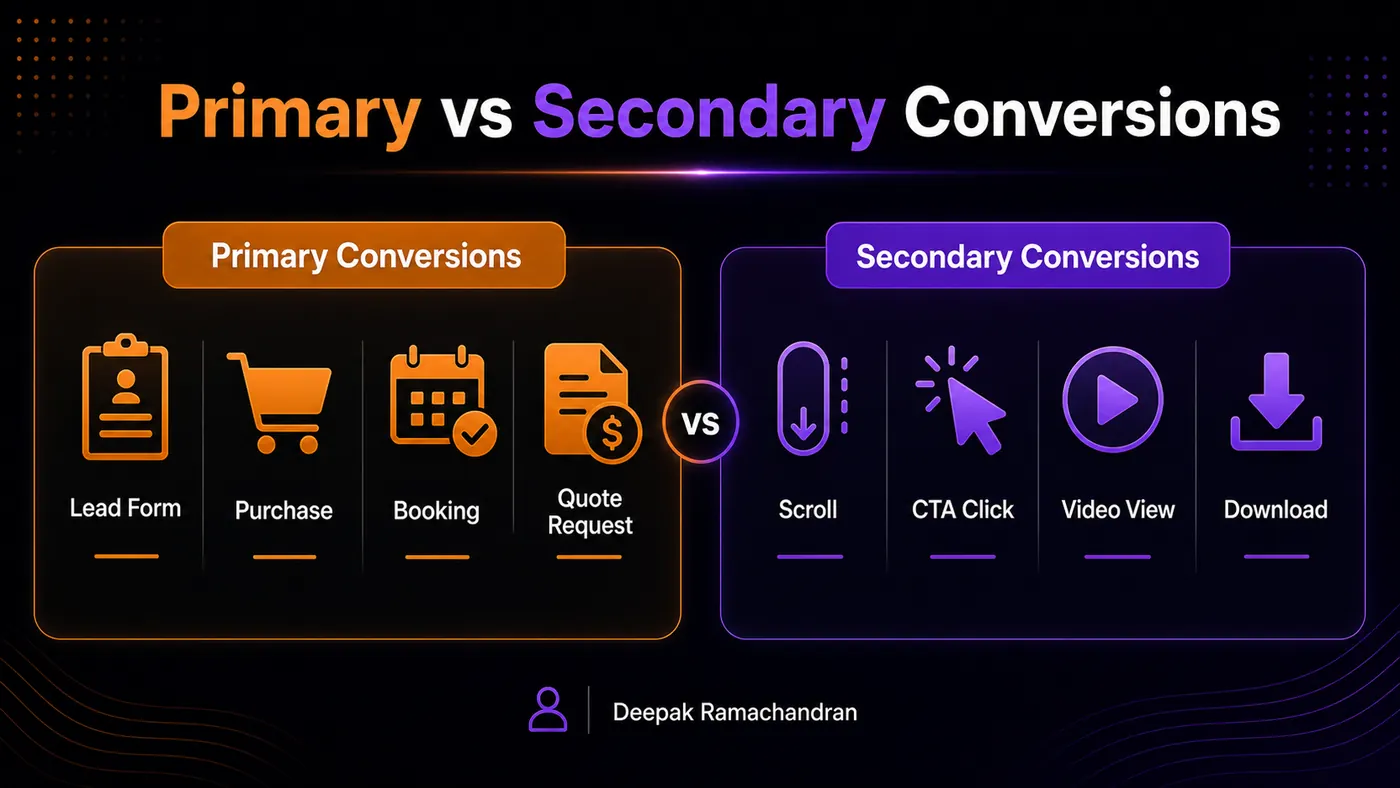
Not all conversions have the same value.
Primary conversions are the most important actions.
Examples:
Lead form submitted
Purchase completed
Appointment booked
Quote requested
Secondary conversions are useful supporting actions.
Examples:
Scroll depth
Button clicks
Video views
Brochure downloads
Page engagement
Contact page visits
Primary conversions should guide campaign optimization.
Secondary conversions help understand user behavior but should not always be treated as final success.
Example:
A WhatsApp click may be valuable, but a confirmed lead form submission may be stronger.
A product page view is useful, but a purchase is more valuable.
This distinction helps avoid misleading campaign reports.
4. Set up website tracking tools
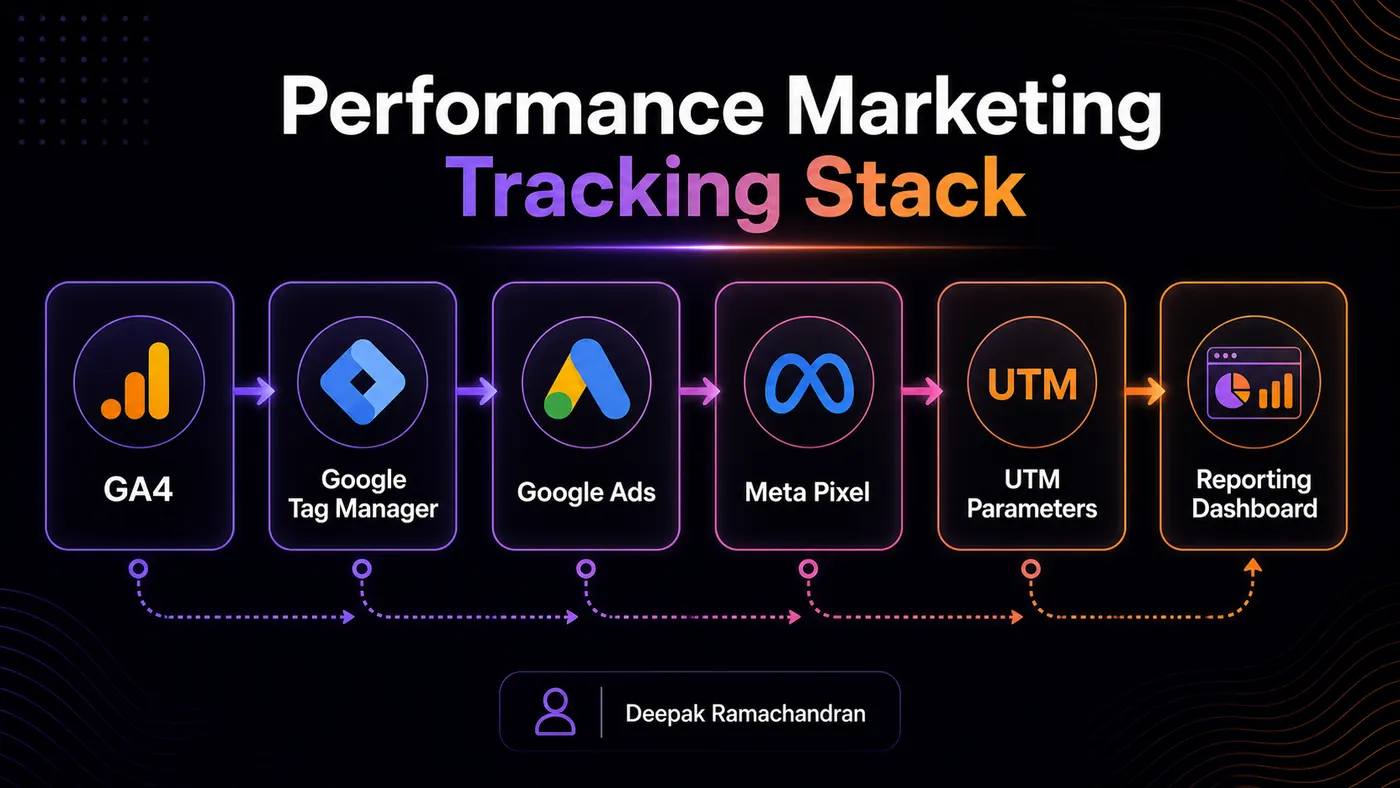
A basic tracking setup may include:
GA4
Google Tag Manager
Google Ads conversion tracking
Meta Pixel
UTM tracking
Form tracking
Thank-you page tracking
Call click tracking
WhatsApp click tracking
For a WordPress website, a clean setup may look like:
Install Google Tag Manager
Add GA4 configuration
Create events for important actions
Mark important GA4 events as key events
Set up Google Ads conversion actions
Install Meta Pixel if running Meta Ads
Test events before campaign launch
Review reports after launch
The setup should be documented.
A simple tracking sheet can include:
Event name
Platform
Trigger
Conversion type
Page URL
Button class or ID
Thank-you page URL
Status
Testing notes
Documentation helps avoid confusion later.
5. Track form submissions properly
Form submissions are one of the most common lead generation conversions.
There are different ways to track forms:
Thank-you page redirect
Form submit event
Button click event
Element visibility trigger
Plugin integration
CRM integration
The cleanest method is usually a successful form submission that redirects to a thank-you page.
Example:
User submits form
User lands on `/thank-you/`
Thank-you page visit is counted as conversion
But this only works if the redirect happens after successful submission.
If the form does not redirect, GTM event tracking may be needed.
Important form tracking checks:
Does the form submit successfully?
Does spam trigger conversions?
Does the thank-you page load only after submission?
Is the same form used on multiple pages?
Is the form tracked in GA4?
Is the conversion imported or sent to ad platforms?
Is duplicate counting avoided?
A conversion should represent a real action, not just a button click that may fail.
6. Track phone and WhatsApp clicks
For service businesses, calls and WhatsApp enquiries can be important conversions.
Common click tracking examples:
Phone link: `tel:`
WhatsApp link: `wa.me` or WhatsApp URL
Email link: `mailto:`
Booking link
External lead form link
These actions can be tracked using Google Tag Manager click triggers.
Examples of event names:
phone_click
whatsapp_click
email_click
book_appointment_click
quote_request_click
For mobile-heavy campaigns, call and WhatsApp tracking can be very important because many users prefer quick contact instead of filling long forms.
But tracking clicks does not always mean the conversation happened.
A WhatsApp click means the user clicked the link.
It does not always confirm that a message was sent.
That is why lead quality should also be reviewed manually or through CRM data.
7. Use thank-you page tracking carefully
Thank-you page tracking is useful, but it must be set up correctly.
Good thank-you page tracking:
Page is accessible only after successful form submission
Page is not indexed unnecessarily
Page is not linked in navigation
Page has a unique URL
Page is not refreshed repeatedly
Page is not used for multiple unrelated actions without clarity
Conversion fires once per successful lead
Weak thank-you page tracking:
Thank-you page can be opened directly by anyone
The page is indexed in Google
The same page is used for every action without separation
The conversion fires on normal page visits
Users can refresh and create duplicate conversions
Bots can trigger fake submissions
A better setup uses both thank-you page logic and event testing.
For example:
Form submission triggers lead event
Thank-you page confirms successful lead
GA4 records generate_lead
Google Ads records lead conversion
Meta Pixel records Lead event
The exact setup depends on the campaign and website.
8. Connect conversions with ad platforms
Tracking inside GA4 is useful, but paid ad platforms also need conversion data.
For Google Ads, conversion actions can be created directly in Google Ads or based on GA4 key events. Google explains that conversions can be created in Google Ads from Google Analytics key events and managed through the Google Ads and Analytics interfaces.
For Meta Ads, the Meta Pixel and events are used to track actions like leads, purchases, registrations, and other website events.
For practical reporting, the marketer should know:
Which platform is tracking which action?
Are conversions counted once or multiple times?
Are GA4 and ad platform numbers expected to differ?
Is the conversion action used for bidding?
Is the action primary or secondary?
Is the event firing correctly?
Campaign optimization depends on clean tracking.
If the wrong action is used as the main conversion, the ad platform may optimize toward weak signals.
9. Use UTM parameters for campaign clarity
UTM parameters help identify where traffic comes from.
A UTM-tagged URL can include:
Source
Medium
Campaign
Content
Term
Example structure:
Source: google
Medium: cpc
Campaign: seo_service_leads
Content: headline_a
Term: seo_consultation
UTMs help reporting tools understand campaign traffic more clearly.
They are useful for:
Google Ads
Meta Ads
LinkedIn Ads
Email campaigns
WhatsApp campaigns
Influencer campaigns
Organic social campaigns
Campaign comparison
A basic UTM plan helps avoid messy reports.
Use consistent naming.
Weak naming:
Campaign1
test-new-final
adset123
Junepost
Traffic123
Better naming:
google_cpc_seo_service_leads
meta_paid_landing_page_audit
linkedin_organic_portfolio_post
email_newsletter_june_leads
Tracking should be readable later, not just during setup.
10. Test conversion tracking before scaling ads
Tracking should be tested before spending serious campaign budget.
Testing steps:
Open the landing page
Submit a test form
Click call button
Click WhatsApp button
Check GA4 DebugView
Check GTM Preview Mode
Check Google Ads conversion status
Check Meta Pixel event testing
Confirm thank-you page load
Check whether duplicate events fire
Check whether events appear with correct names
Check whether conversions are counted properly
Do not assume tracking works because the tag is installed.
A tag can be installed but still not capture the right action.
Testing is what makes tracking reliable.
Common Conversion Tracking Mistakes
Conversion tracking mistakes can damage campaign reporting and optimization.
Common mistakes include:
Running ads without conversion tracking
Tracking only clicks, not leads
Counting page views as conversions
Using button clicks when form submission fails
Not tracking phone or WhatsApp clicks
Not testing events before launch
Not separating primary and secondary conversions
Not using thank-you pages properly
Duplicate conversion firing
Wrong GTM trigger setup
Missing Meta Pixel or Google tag
No UTM structure
Importing weak GA4 events into Google Ads
No documentation
No lead quality review
No CRM or manual follow-up tracking
Changing tracking setup without notes
Not checking tracking after website updates
The biggest mistake is treating tracking as a one-time setup.
In real performance marketing workflows, tracking should be checked after:
New landing page launch
Form plugin update
Website redesign
Button change
URL change
Thank-you page change
Campaign launch
GTM update
Ad platform setup change
Analytics configuration change
Tracking must stay connected to the website and campaign structure.
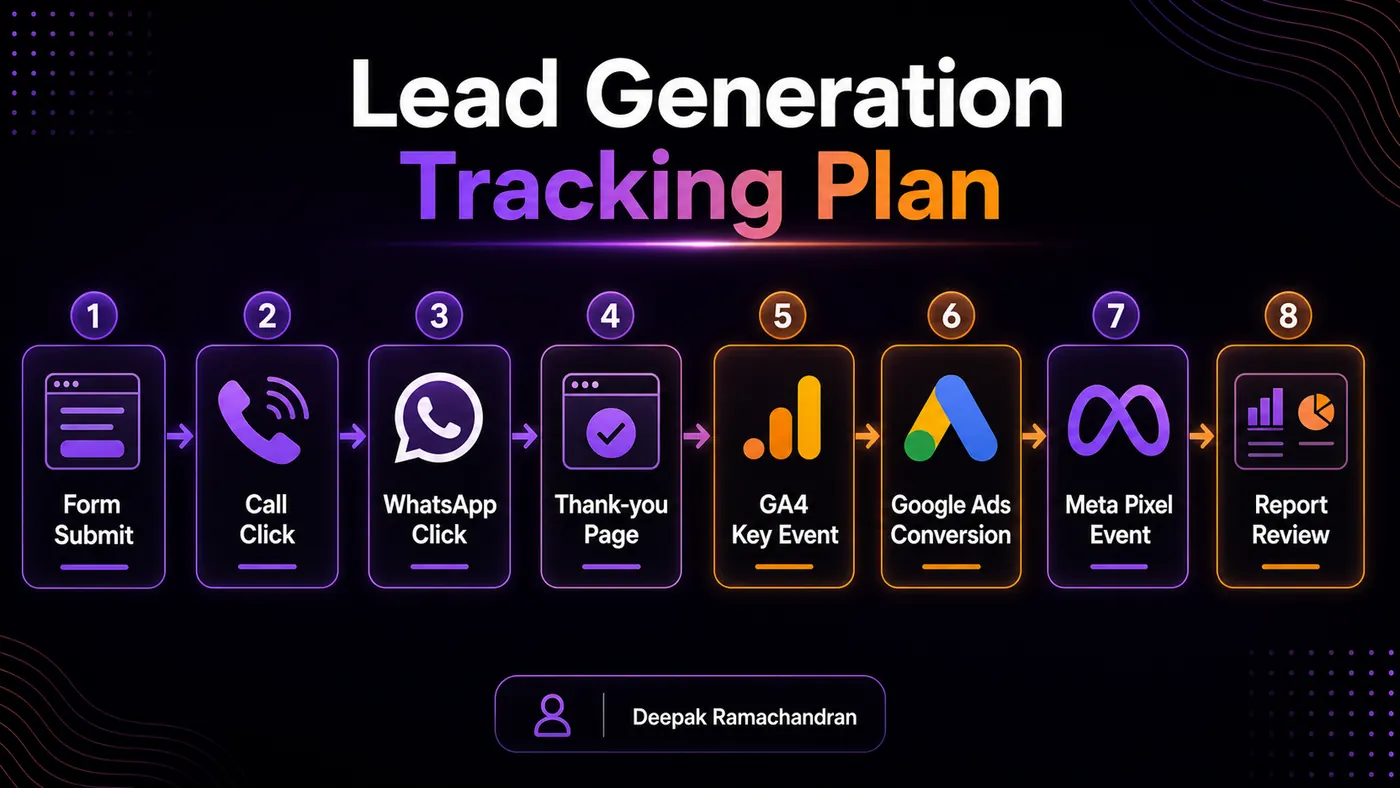
Practical Example: Conversion Tracking Plan for a Lead Generation Campaign
Here is a simple conversion tracking plan for a local service campaign.
Business type:
Interior design service
Campaign goal:
Generate consultation enquiries
Ad platform:
Google Ads and Meta Ads
Landing page:
Interior design consultation page
Primary conversions:
Form submission
Phone call click
WhatsApp click
Secondary conversions:
CTA button click
Brochure download
Contact section view
Scroll depth
Portfolio section click
Tracking tools:
GA4
Google Tag Manager
Google Ads conversion tracking
Meta Pixel
UTM parameters
Event plan:
form_submit
phone_click
whatsapp_click
brochure_download
consultation_cta_click
generate_lead
Thank-you page:
/thank-you-interior-consultation/
UTM example:
utm_source=google
utm_medium=cpc
utm_campaign=interior_consultation_leads
utm_content=search_ad_1
Testing checklist:
Submit test form
Confirm thank-you page loads
Check GA4 DebugView
Check Google Ads conversion action
Check Meta Pixel event
Click phone button on mobile
Click WhatsApp button
Check if duplicate conversions fire
Record setup in tracking sheet
Reporting metrics:
Spend
Clicks
CTR
CPC
Conversions
Conversion rate
Cost per lead
Lead source
Lead quality
Device performance
Landing page performance
This plan is simple, but it gives the campaign a measurable structure.
Without this setup, the advertiser may only know how many clicks were received. With conversion tracking, the advertiser can understand which campaign actions created actual leads.
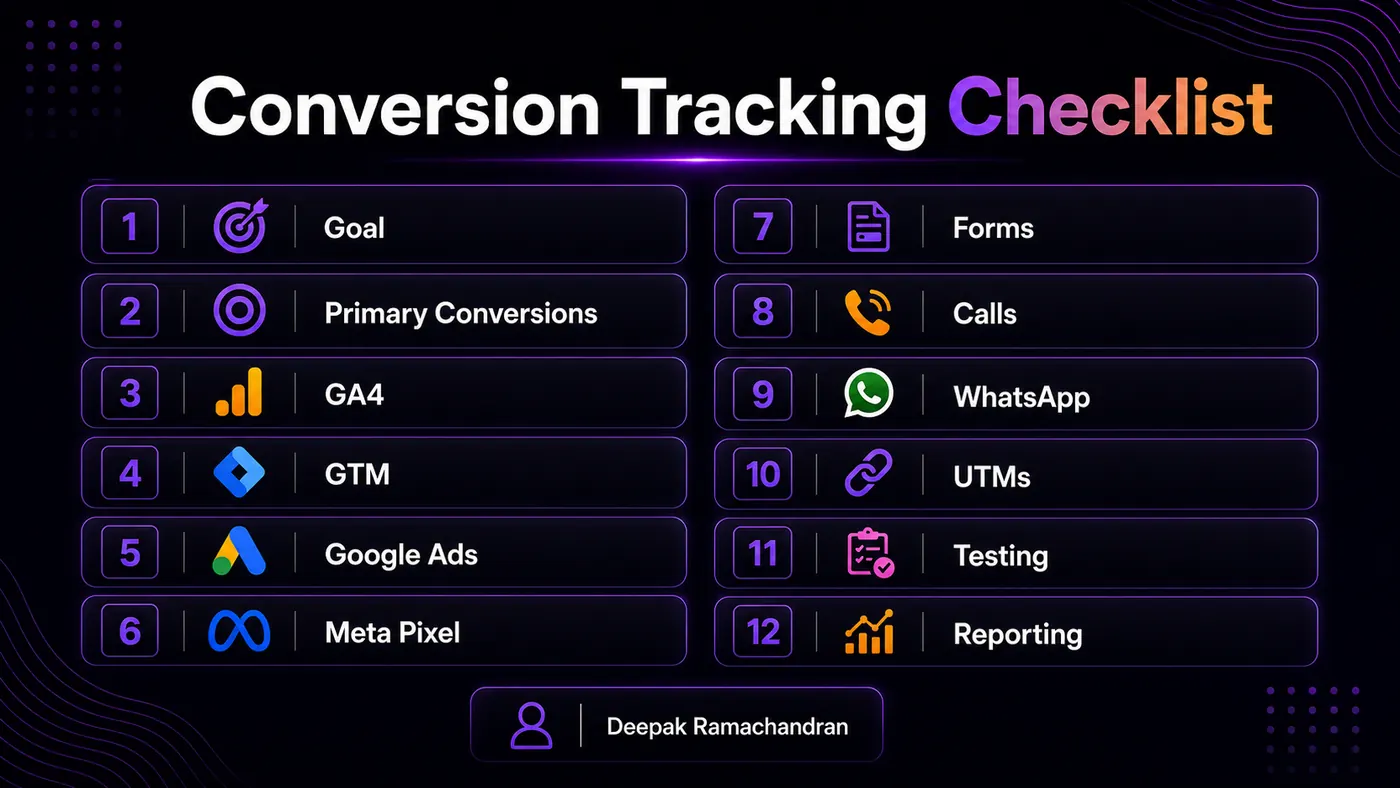
Final Conversion Tracking Checklist
Before launching or scaling a performance marketing campaign, check:
Business goal is clear
Primary conversion action is defined
Secondary actions are separated
GA4 is installed
Google Tag Manager is installed, if used
Google Ads conversion tracking is configured
Meta Pixel is configured, if running Meta Ads
Form submission tracking works
Thank-you page tracking works
Phone clicks are tracked
WhatsApp clicks are tracked
UTM parameters are planned
Events have clear names
Duplicate conversions are avoided
GA4 key events are marked where needed
Google Ads conversion actions are reviewed
Meta events are tested
GTM Preview Mode is checked
GA4 DebugView is checked
Conversion data appears in reports
Tracking setup is documented
Campaign is not scaled before testing
Conversion tracking is not only a technical task. It is a performance marketing decision system.
Conclusion
Conversion Tracking Basics are essential for any performance marketing campaign because they show whether paid traffic is creating meaningful business actions.
Clicks, impressions, and reach are useful, but they are not enough.
A campaign becomes performance-focused when it can measure:
Who clicked
What action they took
Which platform generated the action
Which landing page converted
Which keyword or audience worked
How much each lead or sale cost
Which campaign deserves optimization or budget
For practical campaign growth, conversion tracking should be planned before scaling ads.
The basic workflow is clear:
Define the goal.
Choose conversion actions.
Set up tracking tools.
Track forms, calls, and WhatsApp clicks.
Connect data with ad platforms.
Use UTMs.
Test before launch.
Review performance regularly.
When tracking is clean, performance marketing becomes easier to analyze, improve, and explain.
Related Performance Marketing Guides
- Performance Marketing Resource Hub
- Performance Marketing Guide
- Google Ads Campaign Structure
- Landing Page Optimization for Paid Ads
- SEO and Performance Marketing Services in Thrissur
FAQ Section
What is conversion tracking in performance marketing?
Conversion tracking is the process of measuring important user actions such as form submissions, calls, WhatsApp clicks, purchases, bookings, or sign-ups after users interact with marketing campaigns.
Why is conversion tracking important?
Conversion tracking helps understand which campaigns, ads, keywords, audiences, and landing pages are producing valuable actions. Without it, campaign optimization becomes guesswork.
What are examples of conversions?
Examples include lead form submissions, phone calls, WhatsApp clicks, purchases, appointment bookings, quote requests, brochure downloads, newsletter sign-ups, and demo requests.
What is the difference between events and conversions?
Events are user interactions tracked in analytics tools. Conversions or key events are the important actions selected as valuable for business or campaign measurement.
Should I track WhatsApp clicks as conversions?
For many service businesses, WhatsApp clicks are useful conversion signals. However, a WhatsApp click does not always confirm that a real conversation or qualified lead happened, so lead quality should also be reviewed.
CTA Section
A paid campaign should not be scaled only because it gets clicks.
It should be scaled when the tracking system shows that users are taking valuable actions.
Explore the Performance Marketing Resource Hub for more practical guides on Google Ads, landing page optimization, GA4 reporting, CRO, and campaign planning.
Explore deepakramachandran.com or Contact Digital Marketer in Thrissur for a professional discussion about performance marketing planning and measurement.
Campaign conversion actions for a local service business can include calls, WhatsApp clicks and form submissions when the campaign goal is lead generation.